When you schedule a future time for a post to publish in WordPress, it’s unclear how to “deschedule” it and just publish the post immediately. You can reschedule it for a minute or two from now, but it’s not helpful to do that when the UX can easily work in a “nah, I decided to publish this now” option.
It’s little awkward, otherwise, with that “reschedule it soon” experience. If I reschedule for 9:21 PM and it’s 9:20 when I submit to reschedule, at what point between 9:21:00 and 9:21:59 will the post actually publish? I don’t care to look up how WordPress handles it. You just end up kind of rotting for a bit while you stare at your blog’s front page, before deciding to hit refresh on your browser to see if the post published.
Here’s the default state of the form for saving and publishing in WordPress form. Note all of the places where you can select things. I’ll address that delightful experience in this redesign:

When you schedule to publish the post and save it, here’s what it looks like:

Here’s a somewhat quick redesign, and it’s far from perfect (I would overhaul this form completely, given the other things you need to do here). Simply put a “publish now” option via “unschedule”, on the scheduling line, next to the “edit” CTA (call to action):
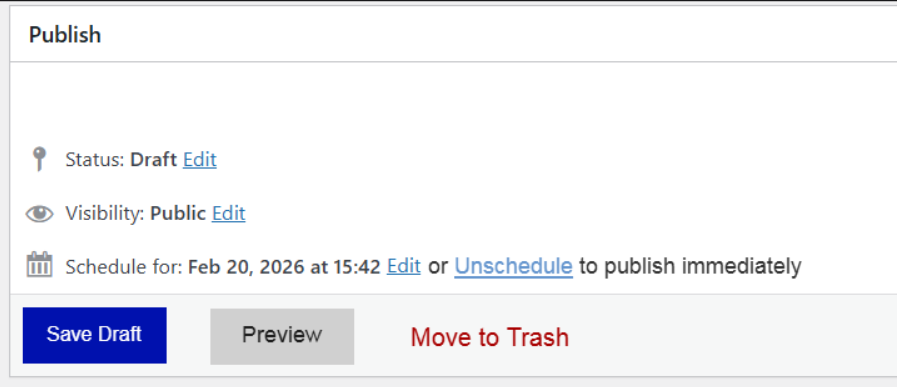
Notice in the above screenshot I consolidated all the buttons in that form into one place, to save your eyes from zigzagging if you’re at a computer. That button redesign would maybe need some work if you were on a mobile device, to avoid mistaps.
After selecting the “unschedule” CTA, the schedule line reverts to the post default, which is “publish immediately.” Note that an additional CTA is inserted into the first position, and the three other ones shift right and shift their UI based on the order, except for the “trash” option:
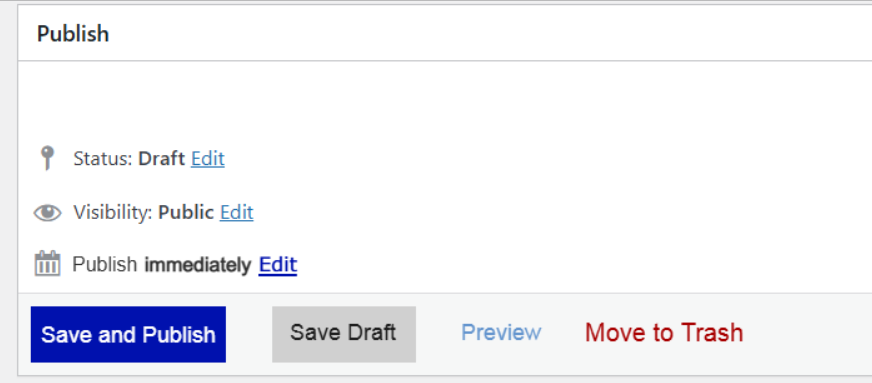
Again, this is a quick fix, because I can already sense other issues emerging with this logic, and I don’t particularly like changing button stacks based on user selection. But at least it’s stupidly clear to the user what’s happening in each state.